
If you want to learn how to sell Notion templates in 2026, start with the real numbers rather than social media revenue screenshots. A Notion template is a ready-made digital workspace that helps someone organize tasks, budgets, client invoices, or projects without building databases from scratch. To sell Notion templates online, you build a focused system that solves one specific problem, publish it as a Notion Site with Duplicate as template enabled, and connect a checkout on Notion Marketplace, Etsy, Gumroad, or your own website.
Quick Answer: How to sell Notion templates & what you actually keep: Build a problem-solving workspace, enable Duplicate as template under Notion’s Publish settings, test duplication in a separate account, and list it on Notion Marketplace or a digital storefront. Under current Notion Marketplace fees of 8% + $0.40 per sale, a $15 template leaves $13.40 (and a $20 template leaves $18.00) before software costs, refunds, and US Schedule C / Schedule SE taxes.
That margin looks attractive on paper, but there is a catch: building a digital product is the easy part, while convincing strangers to buy it is the hard part. A template might take one weekend to build and several months to attract consistent buyers. This guide breaks down how to sell Notion templates step by step, compares exact platform fees, runs the break-even profit math to show when are Notion templates profitable, and explains Notion template taxes for US creators—with zero income hype.
Key Takeaways:
- Platform fees eat low-ticket prices: Under Notion’s published 8% + $0.40 Marketplace fee, a $5 template loses 16% to fees ($4.20 net, requiring 239 sales/month to clear $1,000), whereas a $30 template loses 9.3% ($27.20 net, requiring 37 sales/month).
- Approval & payout delays are real: Direct paid listings on Notion Marketplace require creator waitlist approval and Stripe onboarding, a 14-day hold on each sale, and biweekly payouts with a $20 US minimum balance.
- US taxes apply from dollar one: Net profits are reportable on IRS Schedule C regardless of whether you receive Form 1099-K, and 15.3% self-employment tax (Schedule SE) applies once net self-employment earnings reach $400+.
- Pseudo-passive, not effortless: Selling Notion templates is a low-marginal-cost digital product business that requires upfront validation, documentation, and ongoing traffic acquisition.
Table of Contents
The Reality of Selling Notion Templates (A Transparent Walkthrough)
Let’s start with a concrete example that makes learning how to sell Notion templates much easier to evaluate. Imagine you are a freelance designer or writer who regularly forgets which clients have paid their invoices. You need a clean dashboard showing unpaid invoices, due dates, client contact details, and monthly cash collected. You could build that system in Notion—and thousands of other freelancers face the exact same headache. That gives you a focused product concept: a Freelancer Invoice Tracker.
How we evaluated the setup process
Editorial methodology: For this guide, we used the Freelancer Invoice Tracker as an illustrative product concept to evaluate the documented Notion publishing workflow, platform fee structures, duplication mechanics, and buyer experience. This is a documentation-based walkthrough verified against official platform rules in October 2026, not a claim that MoneyPulsar completed a live commercial template launch or verified personal sales revenue.
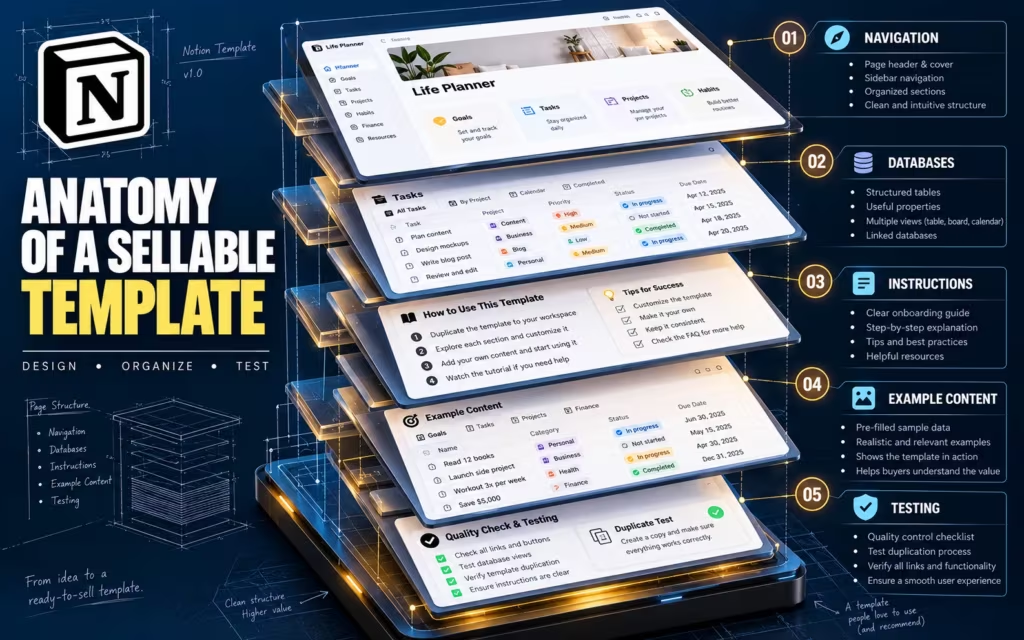
As illustrated in the five layers above, a sellable Freelancer Invoice Tracker needs five functional components working together:
- Navigation Layer: A clean top-level dashboard with quick-action buttons (Add New Invoice, Log Client Payment) and clear links to sub-pages.
- Relational Databases: A Client Directory database linked via a Notion Relation property to an Invoices Ledger database tracking invoice numbers, issue dates, due dates, status tags (Draft, Sent, Paid, Overdue), and Rollup totals.
- Onboarding Instructions: A collapsible callout block or 2-minute walkthrough explaining how buyers customize currency symbols, tax rates, and views without breaking formulas.
- Realistic Example Content: Three to five pre-filled sample clients and invoices so the buyer immediately sees how filtered views work before deleting the dummy rows.
- Duplication & Permission Testing: Verifying in an independent Notion account that all linked views, templates, and formulas copy cleanly in one click.
None of those five layers is technically complex on its own. The value comes from making them work together reliably so a buyer doesn’t spend two hours fixing broken database filters after paying you.
Why a useful template beats a beautiful template
Many beginners researching how to sell Notion templates spend 90% of their time on aesthetic color palettes, custom cover art, and decorative widgets. Visual polish helps your listing thumbnails stand out, but aesthetics alone do not create a product people keep using or recommend.
Imagine choosing between two invoice trackers: one has a gorgeous minimalist homepage but confusing relational databases, while the other is plain and helps you filter overdue client invoices in five seconds. Almost every working freelancer will choose the second. A sellable template solves a specific pain point, removes unnecessary clicks, and is intuitive within three minutes of duplication.
The approval wait and 14-day payout hold are real
Selling directly through Notion Marketplace is not an instant same-day cash machine. According to Notion’s official guide to selling on Marketplace, creators who want Notion to process payments directly must apply for approval, join a review waitlist, and complete Stripe Connect onboarding after acceptance. Notion explicitly notes that reviewing a creator application may take up to a few months.
There is an important distinction: Notion Marketplace also allows creators to list templates that link out to external third-party checkout websites (such as Gumroad or Lemon Squeezy), which do not require Notion’s internal Stripe Connect waitlist. However, when you use Notion’s native Marketplace payment processing, funds do not land in your bank account immediately after a sale. Under Notion’s published payout rules, sale proceeds are held for 14 days to cover the buyer refund window and fraud checks, and payouts are initiated biweekly subject to a $20 minimum balance for US sellers. Build your launch plan around that real timeline.
Step-by-Step: How to Sell Notion Templates and Publish Your Listing
You do not need to be a software engineer to sell Notion templates. You need one validated workflow problem, a clean workspace, a friction-free delivery link, and a storefront where buyers can check out safely.
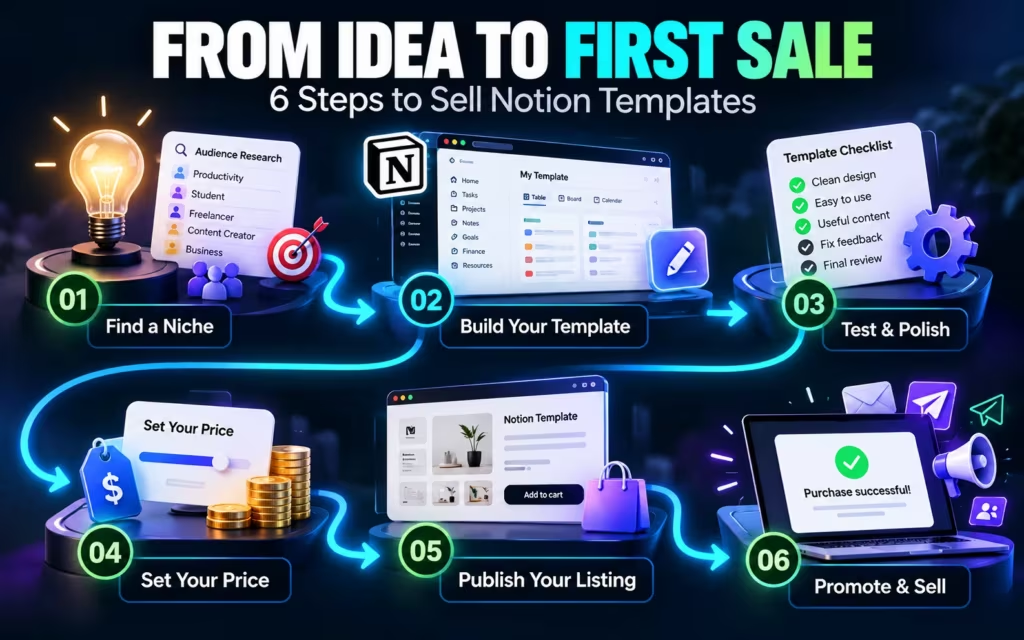
Step 1: Build a template that solves one specific problem
Start with a narrow audience and a single high-friction problem rather than building a bloated “all-in-one life operating system.” Here are six practical product categories beginners often explore when learning how to sell Notion templates:
- 1. Budget & Sinking Fund Trackers: Help households organize monthly cash flow, irregular bills, and debt payoff targets. (If you want to see what makes a personal budget actually work in real life before designing a template, read our guide to 15 practical budgeting tips for 2026.)
- 2. Student & Academic Planners: Track course syllabi, assignment deadlines, exam revision schedules, and GPA calculations.
- 3. Creator Content Calendars: Manage multi-platform publishing pipelines, sponsor deliverables, and hook libraries across YouTube, X, Threads, and blogs.
- 4. Habit & Fitness Trackers: Log daily routines, workout splits, and weekly consistency streaks without overwhelming mobile users.
- 5. Freelancer & Small Business Dashboards: Track client onboarding, unpaid invoices, scope-of-work milestones, and Schedule C deductible expenses.
- 6. Agile Project Managers: Coordinate team sprints, Kanban task boards, and meeting notes for small agencies.

These six categories are starting concepts, not a guarantee that any generic tracker will sell. Before building, search Notion Marketplace, Etsy, and Reddit communities to see what buyers complain is missing or overcomplicated in existing templates. Never copy another creator’s layout—use competitor reviews to spot gaps you can solve more cleanly.
Step 2: Enable “Duplicate as template” and test in a second account
Once your workspace is built, buyers need a reliable way to copy it into their own Notion account without editing your master file. Follow the steps in Notion’s official guide to public pages and web publishing:
- Open the top-level parent page containing your finished template (ensure all child databases live inside this parent page so linked views don’t break).
- Click Share in the top-right corner and switch to the Publish tab.
- Click Publish to publish the page as a Notion Site.
- Toggle ON Duplicate as template (and toggle OFF search-engine indexing on the raw template URL if you are selling it as a paid product via an external checkout).
Crucial QA step: Before listing your product for sale, scrub all personal notes, private client names, and links to external databases outside the parent page. Then open an incognito window with a separate free Notion test account, click Duplicate, and verify that every database relation, formula, and filter works out of the box.
Step 3: Set up your creator profile and listing assets
To list products on Notion Marketplace, set up your creator profile in Notion’s creator studio with a clear business name, a concise bio explaining who your systems help, and 3–5 high-resolution screenshot mockups showing the actual workflow (not just a cover page). Avoid exaggerated income or productivity claims like “this template will double your freelance revenue.” Every submitted template undergoes Notion’s review process before going live.
Step 4: Choose where to sell Notion templates (Platform Comparison)
When deciding how to sell Notion templates, you can use a built-in marketplace, a third-party digital checkout, or your own website. Each route trades off built-in search discovery against transaction fees:
| Selling Platform | Published Fee Structure (Late 2026) | Net Kept on a $15 Sale | Net Kept on a $20 Sale | Main Advantage & Key Limitation |
|---|---|---|---|---|
| Notion Marketplace (Direct) | 8% + $0.40 per transaction (Notion acts as Merchant of Record) | $13.40 ($1.60 fee) | $18.00 ($2.00 fee) | Pro: Native Notion buyer trust & built-in access protection. Con: Creator waitlist approval + 14-day payout hold. |
| Etsy Digital Downloads (US) | $0.20 listing fee + 6.5% transaction fee + 3% + $0.25 US Etsy Payments (excl. Offsite Ads) | $13.12 ($1.88 fee) | $17.65 ($2.35 fee) | Pro: Massive built-in search traffic for planners/trackers. Con: Must deliver link via PDF; 12%–15% fee if sold via Offsite Ads. |
| Gumroad (Direct Link) | 10% + $0.50 Gumroad fee + standard card processing (~2.9% + $0.30) | $12.26 (~$2.74 total fee) | $16.62 (~$3.38 total fee) | Pro: Instant setup with no approval wait; handles global VAT. Con: Higher combined fee on direct links. |
| Gumroad Discover | 30% flat fee (includes processing when buyer finds you via Gumroad Discover) | $10.50 ($4.50 fee) | $14.00 ($6.00 fee) | Pro: Extra marketplace exposure. Con: Steep 30% cut on marketplace-attributed sales. |
| Your Own Website (Stripe) | Standard Stripe processing (~2.9% + $0.30 per transaction) + hosting | $14.26 ($0.74 fee) | $19.12 ($0.88 fee) | Pro: Highest margin per sale & full control. Con: Zero built-in marketplace traffic; you handle tax/VAT setup. |

Before setting your prices on external platforms, review Etsy’s official Fees and Taxes policy and Gumroad’s current fee schedule. If you sell on Etsy, package your Notion duplicate link inside a clean, well-formatted PDF instruction guide so buyers immediately understand they are purchasing a cloud-based Notion workspace rather than an Excel or printable PDF file.
The Math: Notion Marketplace Fees & Why Low-Ticket Templates Are a Trap
This is where most social media side-hustle threads mislead beginners: they show a gross sales dashboard and call it take-home profit. Understanding Notion Marketplace fees and fixed per-transaction charges explains why pricing your template at $5 makes earning meaningful income mathematically brutal.
Notion Marketplace fees explained ($5 vs. $15 vs. $30)
As of late 2026, Notion’s published fee for payments processed directly through Notion Marketplace is 8% of the transaction price plus $0.40 per transaction. That fixed $0.40 charge looks tiny until you run the percentage math on a low-priced template:
- On a $5 template: The 8% fee is $0.40, plus the $0.40 fixed fee = $0.80 total fee (16.0% effective fee rate), leaving you with $4.20.
- On a $15 template: The 8% fee is $1.20, plus the $0.40 fixed fee = $1.60 total fee (10.7% effective fee rate), leaving you with $13.40.
- On a $20 template: The 8% fee is $1.60, plus the $0.40 fixed fee = $2.00 total fee (10.0% effective fee rate), leaving you with $18.00.
- On a $30 template: The 8% fee is $2.40, plus the $0.40 fixed fee = $2.80 total fee (9.3% effective fee rate), leaving you with $27.20.
How many sales do you need to make $1,000 a month?
The table below shows how many completed full-price sales you need each month to clear $1,000 after Notion Marketplace fees (before software costs, refunds, and US taxes):
| Template Price | Notion Fee (8% + $0.40) | Effective Fee Rate | You Keep Per Sale | Sales Needed for $1,000/mo | Visitors Needed at 1% Conversion |
|---|---|---|---|---|---|
| $5 | $0.80 | 16.0% | $4.20 | 239 sales/mo | ~23,900 visitors/mo |
| $15 | $1.60 | 10.7% | $13.40 | 75 sales/mo | ~7,500 visitors/mo |
| $20 | $2.00 | 10.0% | $18.00 | 56 sales/mo | ~5,600 visitors/mo |
| $30 | $2.80 | 9.3% | $27.20 | 37 sales/mo | ~3,700 visitors/mo |
At $5, you need 239 completed orders every single month just to clear $1,000 after platform fees; at $30, you need 37 orders. Of course, a basic habit checklist will not command $30, whereas a specialized Freelancer Invoice & Tax Prep Tracker that saves a self-employed contractor four hours a month easily can. Price your template around the concrete time or money problem it solves.
The $20 example: What do you actually keep?
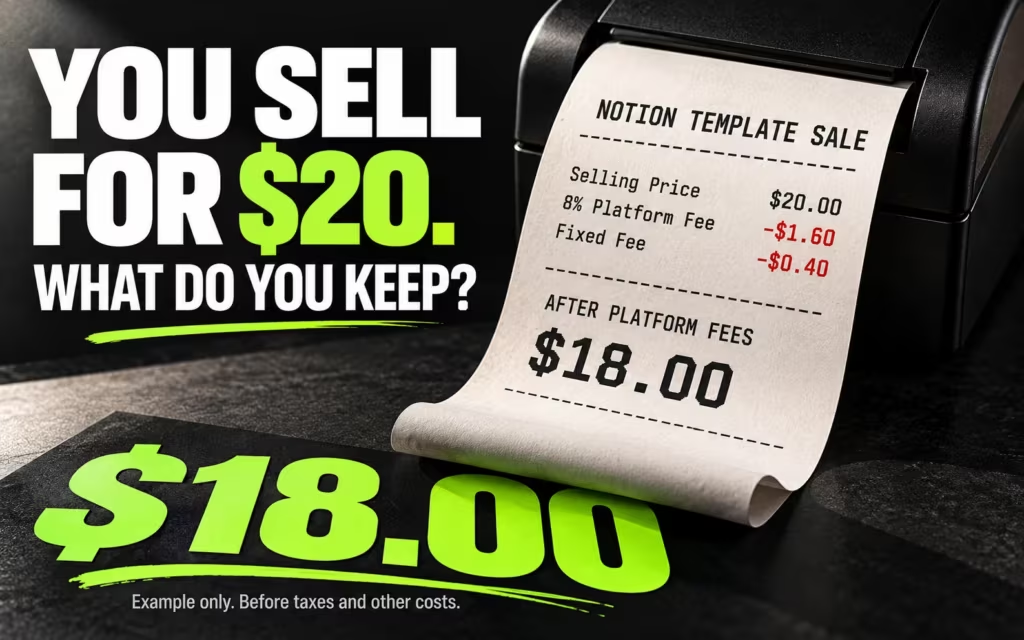
Suppose you sell a specialized template for $20.00 through Notion Marketplace’s direct payment system:
| Calculation Step ($20 Notion Marketplace Sale) | Amount (USD) |
|---|---|
| Customer purchase price | $20.00 |
| 8% Notion Marketplace percentage fee | -$1.60 |
| Fixed per-transaction fee | -$0.40 |
| Remaining after Notion Marketplace fees | $18.00 |
| Illustrative 25%–30% US tax reserve (federal income + 15.3% Schedule SE tax on net profit) | -$4.50 to -$5.40 |
| Estimated spendable cash per $20 sale (before software/ad costs) | ~$12.60 to $13.50 |
A simple Notion template profit formula & 30-sale scenario
You can model any pricing tier before you launch using two simple equations:
- Amount remaining per sale =
Selling Price − (Selling Price × 0.08) − $0.40 - Required monthly sales =
Monthly Income Target ÷ Amount Remaining Per Sale(rounded up to the next whole sale)
For example, if you price your template at $15 and achieve 30 sales in a month ($450 gross revenue), Notion deducts $48.00 in fees (30 × $1.60), leaving $402.00 before software tools and taxes. If you spent 25 hours building and promoting the template in Month 1 and earned $100 after fees, your initial effective hourly rate is $4/hour—though unlike hourly freelance work, that same asset can continue generating sales in Months 2 through 12 without being rebuilt from scratch.
Do You Have to Pay US Taxes on Notion Template Income? (Notion Template Taxes)
Yes. Understanding Notion template taxes early prevents painful surprises at tax time. Money you earn when you sell Notion templates in the United States creates federal—and potentially state and local—tax obligations. When you regularly sell digital templates with the intent to earn a profit, the IRS classifies your activity as a business rather than a hobby. For a typical US sole proprietor or single-member LLC, gross template revenue and qualifying deductible business expenses are reported on IRS Schedule C (Form 1040).
Self-employment tax (15.3%) is separate from federal income tax
If you sell Notion templates as a self-employed creator, your net profit is subject to self-employment (SE) tax in addition to regular federal and state income tax. Once your total net earnings from self-employment reach $400 or more in a tax year, you must file Schedule SE (Form 1040):
- The 15.3% SE Tax Rate: Composed of 12.4% for Social Security (which applies up to the annual OASDI wage base limit of $184,500 in tax year 2026 per IRS Publication 15) plus 2.9% for Medicare (no wage limit, plus an extra 0.9% Additional Medicare Tax on earned income above $200,000 single / $250,000 married filing jointly).
- The 92.35% Multiplier & Above-the-Line Deduction: The IRS calculates Schedule SE tax on 92.35% of your net self-employment profit, and you can deduct the employer-equivalent half (50%) of your SE tax as an adjustment to income on Form 1040 Schedule 1. (Profitable sole proprietors may also qualify for the Section 199A Qualified Business Income [QBI] deduction—ask your CPA.)
Verify the exact calculations in the IRS Topic No. 554 Self-Employment Tax guide and the IRS Schedule SE instructions.
Why the $400 Schedule SE rule and Form 1099-K threshold are not tax-free loopholes
Two common tax myths trip up new digital creators:
- Net profit vs. gross sales ($400 rule): The $400 trigger for Schedule SE applies to net self-employment earnings after deductible business expenses (for example, $700 in gross template sales minus $250 in qualifying software and marketplace fees equals $450 net profit, triggering Schedule SE). More importantly, even if your net profit is under $400, business income is still reportable for regular income-tax purposes.
- Form 1099-K reporting threshold vs. taxability: Under federal law (reinstated at more than $20,000 in gross payments AND more than 200 transactions for Third-Party Settlement Organizations per IRS Fact Sheet FS-2025-08 and IRS Form 1099-K guidance, though several US states enforce lower state reporting thresholds such as $600 and direct payment-card processors have no minimum threshold), you might not receive a 1099-K in your first year. Whether or not you receive Form 1099-K, 100% of your taxable business profit must be reported to the IRS.
Track Schedule C deductions, quarterly estimated taxes & sales tax
Keep a clean ledger from your very first sale. Under the IRS Schedule C instructions, ordinary and necessary business expenses—such as Notion Marketplace/Etsy/Gumroad transaction fees, business-use portions of design software (like Canva), custom domain and hosting fees, and paid ads—reduce your taxable net profit. If you expect to owe $1,000 or more in federal tax after withholding and credits, check the IRS Estimated Taxes guide (Form 1040-ES) to avoid underpayment penalties. Finally, note that while Notion Marketplace and Gumroad act as Merchant of Record to collect and remit digital sales tax/VAT on transactions they process directly, selling via your own custom website may create state sales-tax nexus obligations.
Are Notion Templates Profitable & Actually Passive Income?
When beginners ask are Notion templates profitable and whether they count as true passive income, the honest answer is that they are a low-marginal-cost digital product business—not effortless passive cash flow. Once you build copy #1 of a template, delivering copy #2,000 costs $0 in manufacturing or shipping. However, customer demand never runs on autopilot. That is why in our 4-tier breakdown of how to make passive income in 2026, we classify digital templates as pseudo-passive income (low upfront cash, high upfront and ongoing marketing effort), completely distinct from capital-based passive income like investing in low-cost index funds or building long-term tax-advantaged wealth in our 20s retirement roadmap.
Four realistic ways to find customers

Instead of uploading a template and hoping strangers stumble across it, pick one primary acquisition channel and master it for 90 days:
- Pinterest Visual Search: Create clean vertical pins demonstrating the specific before-and-after problem your template solves (e.g., a visual breakdown of a zero-based monthly budget tracker or student assignment dashboard).
- Google SEO & Long-Tail Tutorials: Publish written guides answering exact workflow questions your target buyer searches for—such as how freelancers track overdue client invoices or how households organize sinking funds.
- Short-Form Video & YouTube Walkthroughs: Record 2-to-5-minute screen-share tutorials showing how the database relations and buttons actually work in real time.
- Niche Communities (Value First): Participate genuinely in freelancer, student, or budgeting communities by answering workflow questions first, sharing your template only where self-promotion is explicitly permitted.
Avoid the #1 beginner mistake (building before validating): Never spend 40 hours building a massive workspace before proving people want it. Start with a focused, single-problem tracker, validate that strangers will download or buy it, and if you earn extra side-hustle cash, put that net profit to work—whether that means clearing 22%+ APR credit cards using our debt payoff guide and free debt payoff calculator, or automating monthly index-fund contributions.
Frequently Asked Questions About Selling Notion Templates
How much money can I make when I sell Notion templates?
There is no guaranteed income when you learn how to sell Notion templates: some sellers earn nothing, while others generate consistent monthly sales. Whether Notion templates are profitable depends on customer demand, pricing ($15–$30+ vs. $5 low-ticket listings), qualified search or social traffic, platform fees, and ongoing support work.
Can I sell Notion templates for free?
Yes. You can build and publish templates using Notion’s free plan and distribute free templates to grow an email list, or charge for an original template through Notion Marketplace, Gumroad, Etsy, or your own site. Paid sales still incur Notion Marketplace fees (8% + $0.40) or third-party payment processing fees.
Do I need a business license to sell Notion templates in the US?
There is no single federal business license required solely to sell Notion templates, but your state, city, or county may have local business registration, DBA, or tax requirements. Even as an unregistered sole proprietor, net business profits are reportable on IRS Schedule C.
What are Notion Marketplace fees in 2026?
For direct paid transactions processed through Notion Marketplace, Notion charges 8% of the transaction price plus $0.40 per transaction. On a $15 template sale, Notion deducts $1.60 (leaving $13.40); on a $20 sale, Notion deducts $2.00 (leaving $18.00) before your software costs, refunds, and US income/self-employment taxes.
How long does Notion Marketplace creator approval and payout take?
Creators applying for direct Notion Marketplace payments must join a review waitlist and complete Stripe onboarding, which Notion notes can take up to a few months. Once approved, funds from each sale are held for 14 days before becoming payout-eligible, and payouts run biweekly subject to a $20 minimum balance for US sellers.
Can you sell Notion templates on Etsy and Gumroad at the same time?
Yes, unless you sign an exclusivity agreement, you can list your original templates across Notion Marketplace, Etsy, Gumroad, and your own website simultaneously. On Etsy, you upload a clean PDF guide containing your template duplication link and onboarding instructions.
How do you stop buyers from sharing your Notion template link?
No publicly accessible Notion duplicate link is 100% immune to link sharing, though Notion Marketplace offers native access controls for direct purchases. When selling via Etsy or Gumroad, deliver the duplicate link inside a post-purchase PDF, rotate links if abused, and focus on specialized business/freelancer workflows where buyers value official updates and instructions.
How do Notion template taxes work if I earn under $400?
Under IRS rules, self-employment tax (15.3% via Schedule SE) generally applies once your net self-employment earnings reach $400 or more. However, even if your net profit from selling Notion templates is under $400—or below the federal Form 1099-K threshold ($20,000 and 200 transactions for TPSOs)—you must still report taxable net business income on your federal tax return.
Final Verdict: Is Selling Notion Templates Worth It in 2026?
Learning how to sell Notion templates is a practical, near-zero-overhead side hustle experiment if you enjoy organizing messy workflows into simple digital systems. You hold zero physical inventory, your upfront cash outlay can be $0, and a well-built template can be duplicated thousands of times.
However, treat it like a real small business from day one: price your product so fixed transaction fees do not devour your margin, plan around Notion’s approval waitlist and 14-day payout hold, track every deductible expense for Schedule C, and focus 80% of your energy on solving a real buyer problem and earning traffic. You aren’t buying effortless passive income by opening a Notion account—you’re building a lean digital product asset whose returns depend on the value you deliver.
Official Sources, Methodology & Financial Disclosure
How We Researched This Guide: All platform fee formulas, payout hold windows, and US federal tax rules in this guide were verified against primary official documentation as of October 26, 2026, following MoneyPulsar’s editorial standards. All revenue and profit tables are mathematical illustrations, not guaranteed or verified earnings from a commercial MoneyPulsar template store. MoneyPulsar is not affiliated with or endorsed by Notion Labs, Inc., Etsy, Inc., or Gumroad, Inc.
- Notion Help Center — Selling on Marketplace (8% + $0.40 Fee, Stripe Onboarding, 14-Day Hold & Biweekly Payout Rules)
- Notion Help Center — Public Pages, Notion Sites & “Duplicate as Template” Publishing Settings
- Etsy Help Center — Fees and Taxes for Selling on Etsy ($0.20 Listing, 6.5% Transaction & Etsy Payments Fees)
- Gumroad Help Center — Gumroad Fees (10% + $0.50 Direct vs. 30% Discover Marketplace Fee)
- Internal Revenue Service (IRS) — Topic No. 554, Self-Employment Tax ($400 Net Earnings Threshold & 15.3% Rate)
- IRS — Instructions for Schedule SE (Form 1040), Self-Employment Tax & 92.35% Net Earnings Calculation
- IRS — Instructions for Schedule C (Form 1040), Profit or Loss From Business (Sole Proprietorship)
- IRS — Understanding Your Form 1099-K & Fact Sheet FS-2025-08 ($20,000 and 200 Transactions TPSO Rule)
- IRS — Estimated Taxes (Form 1040-ES Quarterly Safe-Harbor Rules)
Financial & Tax Disclaimer: This MoneyPulsar article is for general educational purposes in the United States and does not constitute personalized financial, legal, accounting, or tax advice. Marketplace fee schedules and federal/state tax rules change over time; consult a certified public accountant (CPA) or qualified tax professional regarding your specific circumstances. Read our full Financial Disclaimer.

Syed Hamza Hasnain · Founder & Editor
Syed Hamza Hasnain is the Founder and Editor of MoneyPulsar. He researches and edits practical guides on budgeting, debt payoff, index investing, and retirement planning across our US and Pakistan tracks using primary regulatory sources. Learn more about our editorial process →